Oh so yet I don’t want to share but I don’t want to be a fish so these are some tips that I found during exploring the community. I will try to explore more to share to you guys
Because…“Knowledge is always created by Experience” -My brain
If you guys found anything cool or some tips, just try to share it here! I can’t find them all  . Now I need to use AI to helps find these since I don’t know anymore and don’t know codes, so well…
And probably there’s many people that knew already so it’s useless. But anyway here are them:
1. Did you know that you can know who's online right now?
A.
By using the chat, you can know who’s online by seeing their avatar(Profile picture, pfp). If theirs has a green circle around then the user is probably online right now, and also maybe afk. Here’s what look like:

Or this one:

But the limit is that it only works in chat, you can’t see it if the user isn’t on chat. So we come to next way to see
B.
So if the green circle has limit, then this one maybe doesn’t 
Ok so have you ever click on a user’s profile? Yes? Wow that’s cool Detective! Then maybe you also knew this! By clicking on a user’s profile. You can see something like this:
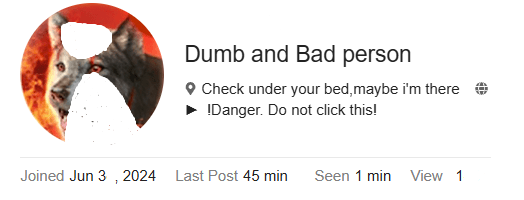
Mostly all of you know what do the “Joined” and “View” do already so let’s explain the couple between them
“Last Post”: This will show when was the last post that this user posted. In example, my last post was from 45 mins ago then it will show as “45 mins” like the picture
“Seen” This is the thing I’m talking about, this will show when was this user last seen. Now we are entering it! If it shows as “Just now” in the “Seen”. The user is online right now! But if the user just quit for some seconds then this won’t work, that’s the limit So if you don’t understand, here’s a picture :

C.
With the update on 2026-06-30T00:00:00Z You can now see users that are online on the homepage, so just simply click on the Sweezy Community logo and it will go to the homepage so you can see who’s online.
2. You can get gif from bro-mons! (Apparently doesn't work anymore)
So how to do it? Well, here’s the code if you need:

Remember to replace the word “Krursor” with name of bro-mon that you want to see it in gif. And yet, each bro-mon’s gif may has different way to type so just ask anything you wonder and I’ll try to answer
So by using that same code or whatever you call it. You can see all the bro-mons!
Note: I don’t recommend you to do this because if you do that the game will lose the fun of it. Remember that I warned you.
You only need to type the monster’s name and now you got the appearance of it
But you need to know the name of the monster! How to find it? I won’t share currently because I want to keep the fun of the game so find it yourself
3. Some tips about Monster Idea
If you made an idea topic, remember to not:
-
Don’t mention(using @) on random people. It notifies them
-
Don’t make your idea too rare! The Crush(Level, Rarity) shouldn’t always be Mythical, the more bro-mon there are, the less rare they are
-
AI generated picture is not liked by some people here. It’s better to draw it yourself, hardwork always paid!
-
If you want to do anything is considered as inapproriate then we are sorry, you won’t fit with this community, this community mostly used by Positive People so please don’t do anything bad if you want to chat with us!
-
The Developers add ideas by 2 ways!
The first is by its Quality, the idea was made by a hardworking person and it looks so good! The Developers love it so much that they will make it on the adding list!
Second is by fame, if the idea has many votes. It will also get added
- But remember to not asking people to vote for you ideas! It’s their choice so…
4. You can make special texts!
Most communities support BB Code, and you can use some of them here!
-
Bold Texts:Pretty easy! You will do this " ** "
Just enter what you want to say between them and you will get the bold texts!
** Hello! ** = Hello! (Note:Don’t put space between the ** and the words!) -
Emphasized Texts:Use this " _ "
The same as the Bold Texts but replace the ** with _!
_ P _ = P (Look! It’s the Pisa Tower! Note:Same as the Bold Texts!)
The next and some others will be a little complicated at first but easier later!
-
Striked Texts:Use this “<s>” And “</s>”
Put the words between them! Let’s practice!
<s>Striked</s> =Striked(Note: Don’t mess with the <s> or the other one, or theStriked Textswon’t appear! -
Marked texts:Want to mark it? Use this “<mark>” And “</mark>”
Same as the 3rd!
<mark>Important!</mark> = Important! (Note: Same as the 3rd) -
Deleted texts:Delete something but others still can see? Use this “<del>” And “</del>”
Like the two up there!
<del>I know Top Secret</del> =I know Top Secret(Note:Still the same, but you can’t delete thestrike ) -
Replaced texts:A combo with the
Deleted texts! After using theDeleted texts, you can use Replaced texts to replace it. It’s mainly for editing posts.
<ins>Green Screen</ins> = Green Screen (Note: You can’t delete the underline )
You can’t make colorful texts on this community But this will replace it currently!
-
Blue texts:Make your texts blue! Use this “<a>” And “</a>”
Still like them
<a>I’m blue</a> = I’m blue (Note:This is supposed to use for links, so don’t type links!) -
Sized Texts:Control your texts’ size!(Limited sizes)
Use the “#” before you use texts to control the size
##### I’m smaller =
I’m smaller
The “#” symbols and the texts need a space between them for it to work!
There are 6 sizes currently, control the size with the numbers of “#”. The more, the smaller. The less, the bigger. Having 4 “#” = Normal size
-
Squared:Make a square around your texts?
Use the <> again, but it’s <kbd>
<kbd> </kbd> =
You can use it on every letters, special letters. I’m not sure what’s it called and the purpose, but I guess it’s useful for Solution like LaTeX? -
Underlined Texts:Underline your texts?
The purpose of this feature wasn’t about underline, it was something else a bit more complicated. But since that feature doesn’t seem to work here, so we may use it as underline?
<abbr title=“A”>This is a road</abbr>=This is a road
You can type whatever is in the “” because it needs atleast a letter for it to works
- Of your words:2 lines at a time!
This was actually used for languages learning, it’s for pronunciation. But we can type anything, not only the correct pronunciation so we will use it!
<ruby>  <rt>
<rt>  </ruby> =
Replace the with the words you want to type under, the :hat: is for the words on the previous words. They are reversed like that
-
Codes without outline?
:You get no space limit and another font
<pre>Hello World!</pre> =
Hello World!
I didn’t try typing codes on this so I don’t know if it still interacts with codes. If you want a distance between two words then just do a lot of spaces between the two words
-
Hover texts:Show a message when hover on it
<span title=“Hello”>Hover on me</span> = Hover on
me -
Relocated like Microsoft Words
<div align=“center”>Surrounded by nothing</div> =
- Chemical4 Symbols2
H<sup>2</sup>SO<sub>4 = H2SO4
Note:“Sub” will moves your texts down. “Sup” will moves your texts up
5. Some special features
If you didn’t know, this website is based Discourse built. Which means the features that are available on Discourse is usually also available here and other websites with based Discourse. It will be rarer because it may doesn’t appear anywhere clearly, just hiding somewhere!
-
Checklists:It’s not common here, but it’s useful for some quests thing!
[] =
You can interact with it because it’s a checkbox! Try to click on it and you will see it having a checkmark inside it! -
Time thing:I don’t know the exact meaning of it
[date=2025-12-31 time=24:00:00 timezone=“Germany/Berlin”]
= 2026-01-01T00:00:00Z
Note:These time thing changes in different timezones, making it even more useful
That’s all I know for now, I’ll try to explore more!
 revived